AI Assistant for Architects:Turning Intent Into Controlled Design Changes
AIB2BArchitectureDesktop
Project Overview
At SWAPP.AI, I led the end-to-end product design of a domain-specific AI assistant that helped architects translate natural-language requests and visual annotations into clear, reviewable changes across architectural plans.
As the product designer responsible for the experience, I worked closely with product managers, engineers, data specialists, and SWAPP’s in-house architects. The architects served as both domain experts and daily users, giving us continuous access to real workflows, terminology, constraints, and feedback.
The assistant analyzed each request within the context of the plan, highlighted relevant areas, explained potential issues, and surfaced related changes that might require attention. Rather than applying decisions silently, it allowed architects to review the system’s interpretation and remain in control before meaningful changes were made.
The design challenge was not simply to make architectural work faster. It was to turn complex AI behavior into a workflow that felt understandable, precise, and trustworthy enough to support professional judgment.
Continuous Research With Architects
Using daily access to domain experts to shape the product as it evolved
SWAPP’s in-house architects were not occasional research participants. They were active collaborators who worked with architectural plans every day and could evaluate whether the assistant’s language, reasoning, and recommendations made sense within a real professional workflow.
Their feedback helped us identify where the AI needed more context, when its reasoning had to be explained, which decisions required explicit confirmation, and how much information architects needed before they could act with confidence.
I translated those insights into an evolving interaction model, working closely with product, engineering, and data teams to align the interface with both architectural practice and the system’s changing capabilities. Each iteration refined not only the screens, but also the rules governing the conversation between architect and AI.
Designing for Architectural Judgment
Helping architects evaluate complex changes without losing context or control
Architectural decisions are interconnected. Moving a wall, changing a corridor, or adjusting an opening can affect dimensions, accessibility requirements, annotations, and other elements across the plan.
Reviewing those relationships manually requires architects to move repeatedly between drawings, regulations, and project details. The challenge was not only to detect a potential issue, but to present it with enough context for the architect to understand its impact and decide what should happen next.
The experience needed to help architects:
express design intent through familiar language or visual annotations
understand how the AI interpreted each request
locate issues directly within the architectural plan
review related implications before approving a change
preserve professional judgment at every decision point
This reframed the product from a command interface into a decision-support workflow, one that could reduce manual investigation while keeping architectural responsibility with the user.
Designing the System Before the Interface
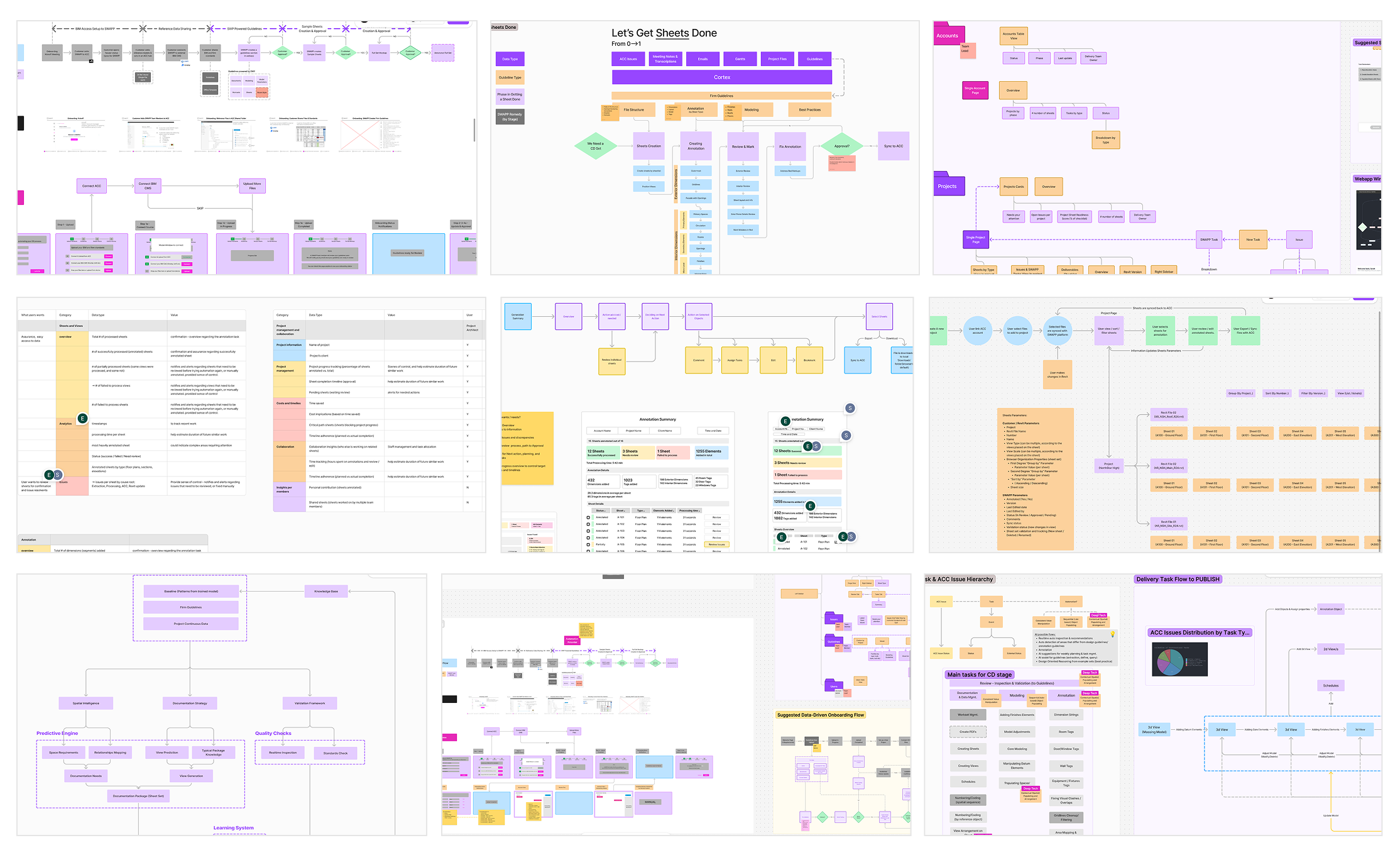
Mapping how intent, AI interpretation, validation, and human decisions connect
Before designing individual screens, I mapped the complete interaction between the architect, the AI, the architectural plan, and the relevant constraints.
The system flow defined how a request entered the experience, how the AI interpreted it, when additional context or clarification was needed, how potential issues were presented, and where the architect had to review or approve the next step.
The mapping established four foundations for the product:
a conversational flow grounded in the active architectural plan
visible interpretation and validation before action
clear decision points for architect review and approval
a structure that could support additional workflows as the system evolved
By resolving these relationships first, the interface could reflect the product’s underlying logic instead of becoming a collection of disconnected AI responses.
System mapping connected user intent, AI interpretation, validation, and architect approval into one continuous workflow.
Turning System Logic Into a Guided Conversation
Making a complex AI workflow feel familiar, transparent, and actionable
The interaction model was designed around a familiar behavior: architects describing what they wanted to change while working directly with the plan.
The assistant did more than respond to a prompt. It connected the request to the relevant location, communicated its interpretation, surfaced potential issues, and guided the architect toward a reviewable next step.
Four principles shaped the conversation:
Start with the architect’s language. Users could describe intent without translating it into system commands.
Make interpretation visible. The interface showed how the AI understood the request before moving forward.
Clarify only when needed. Follow-up questions were used when missing context could materially affect the result.
Turn every recommendation into a decision. Meaningful changes remained reviewable and required architect approval.
This structure made the conversation predictable without forcing every request through a rigid sequence.
01
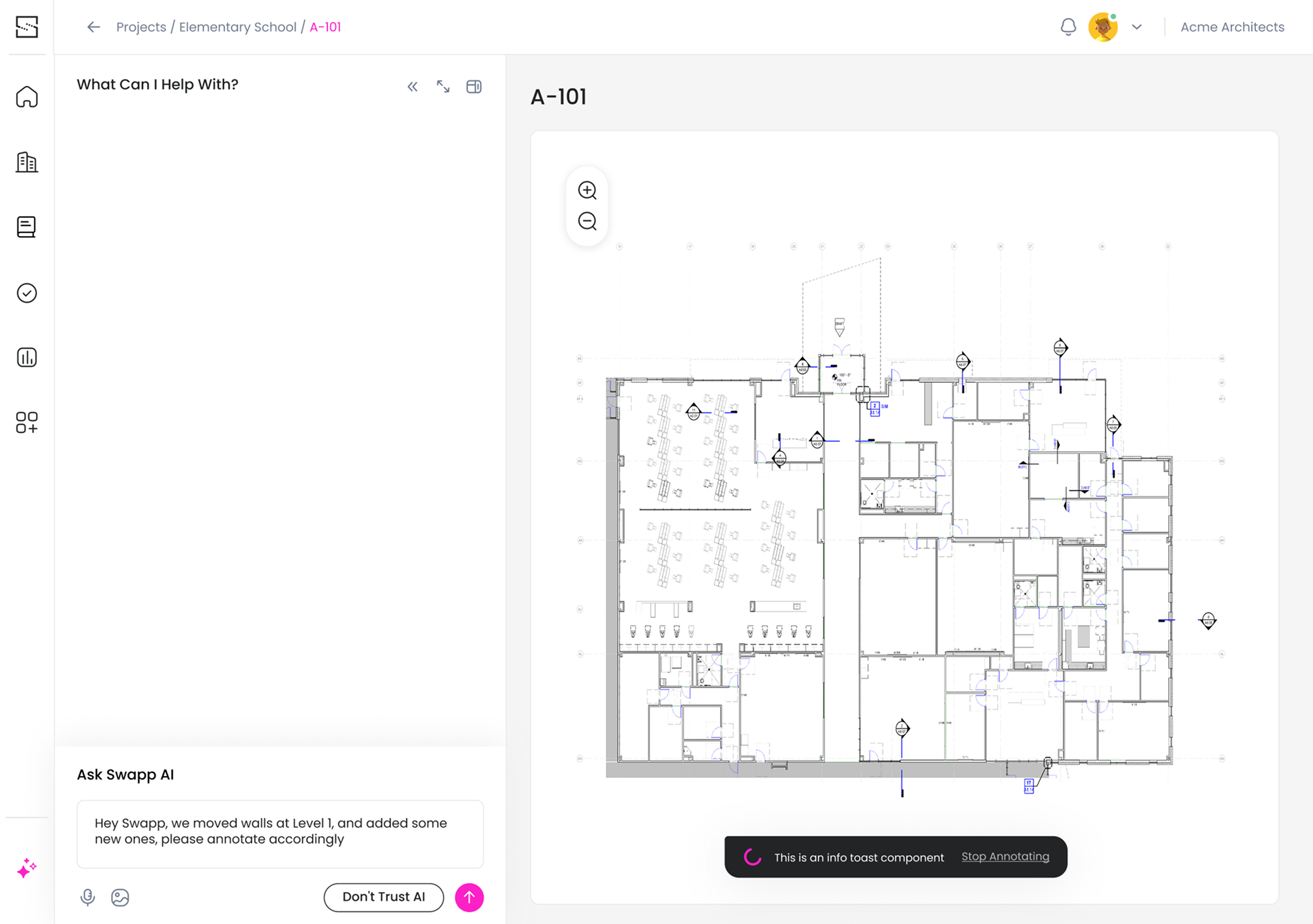
Start With Intent, Not Commands
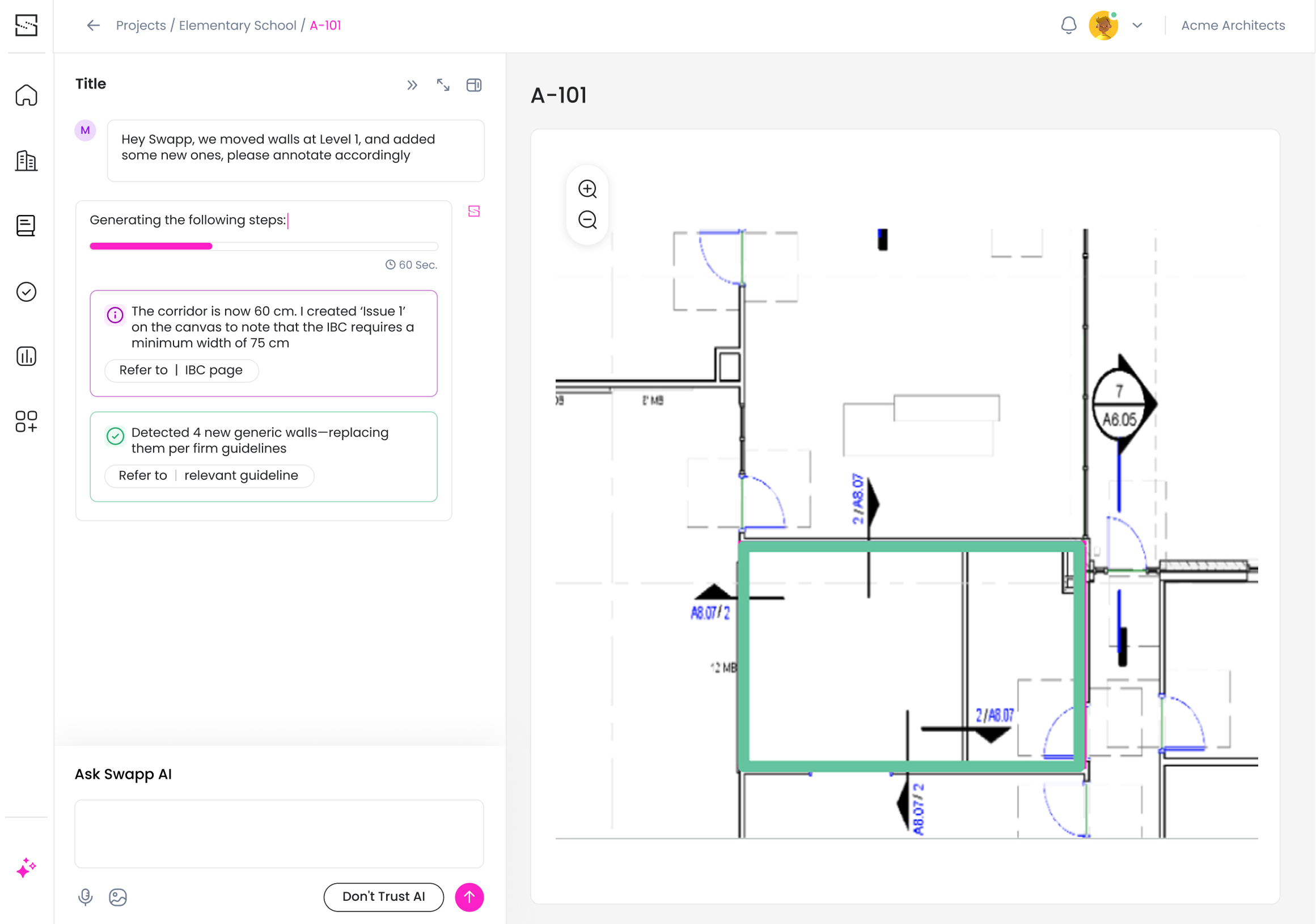
The architect begins with a natural-language request while the relevant plan remains visible in the workspace. This keeps the interaction grounded in the design context and removes the need to translate professional intent into predefined system commands.
Because interpreting an architectural request can take time, the interface immediately communicates that the assistant is analyzing the prompt. This visible processing state sets expectations, confirms that the request was received, and prevents uncertainty during a complex AI operation.
02
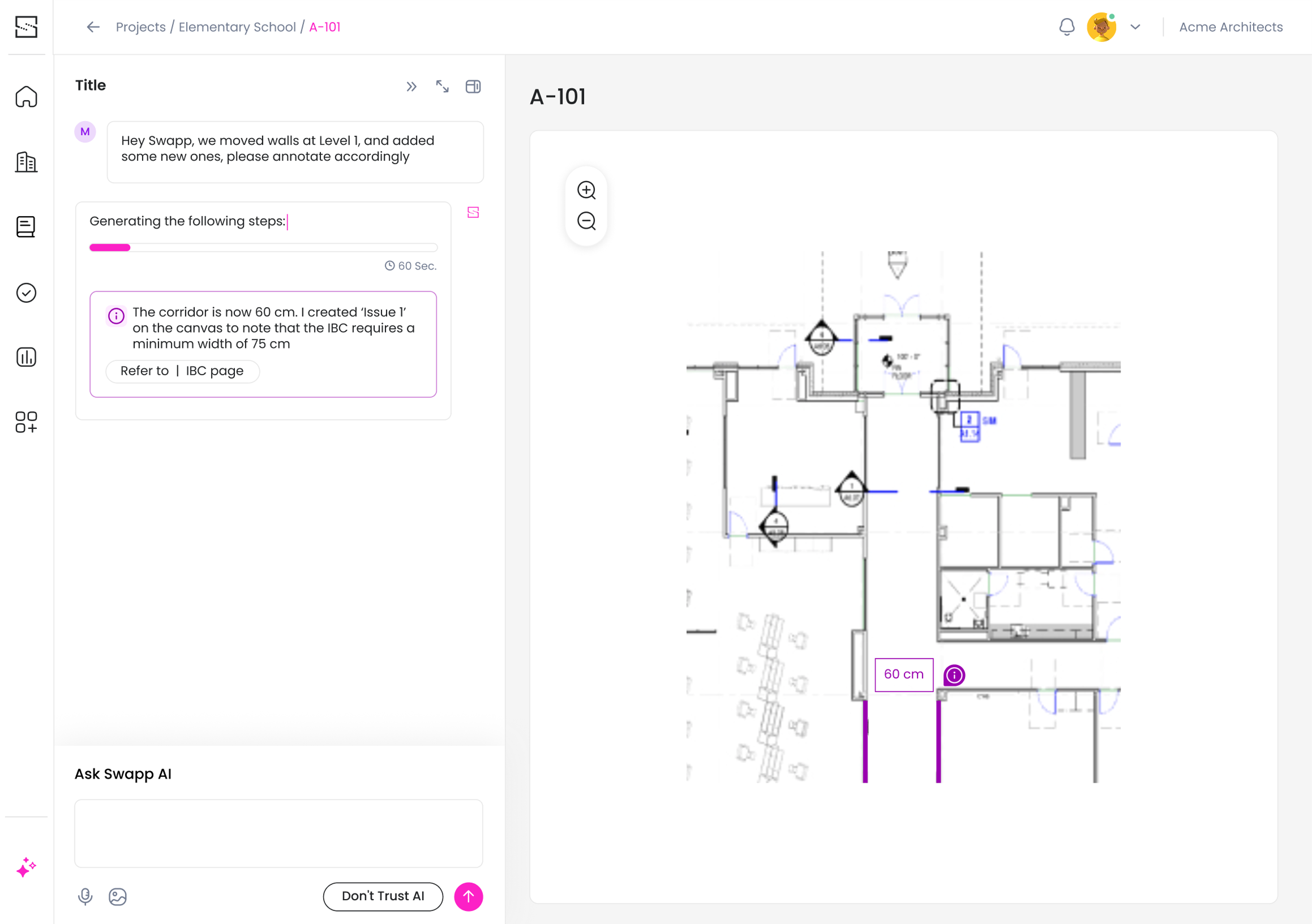
Connect the Explanation to the Plan
Once the request is interpreted, the assistant connects its response to the relevant location on the drawing. The affected area is highlighted alongside a concise explanation of the issue and the reasoning behind the recommendation.
Presenting the visual evidence and the explanation together reduces the effort required to locate and understand the problem. The architect can evaluate the recommendation within its spatial context instead of relying on an abstract AI response.
03
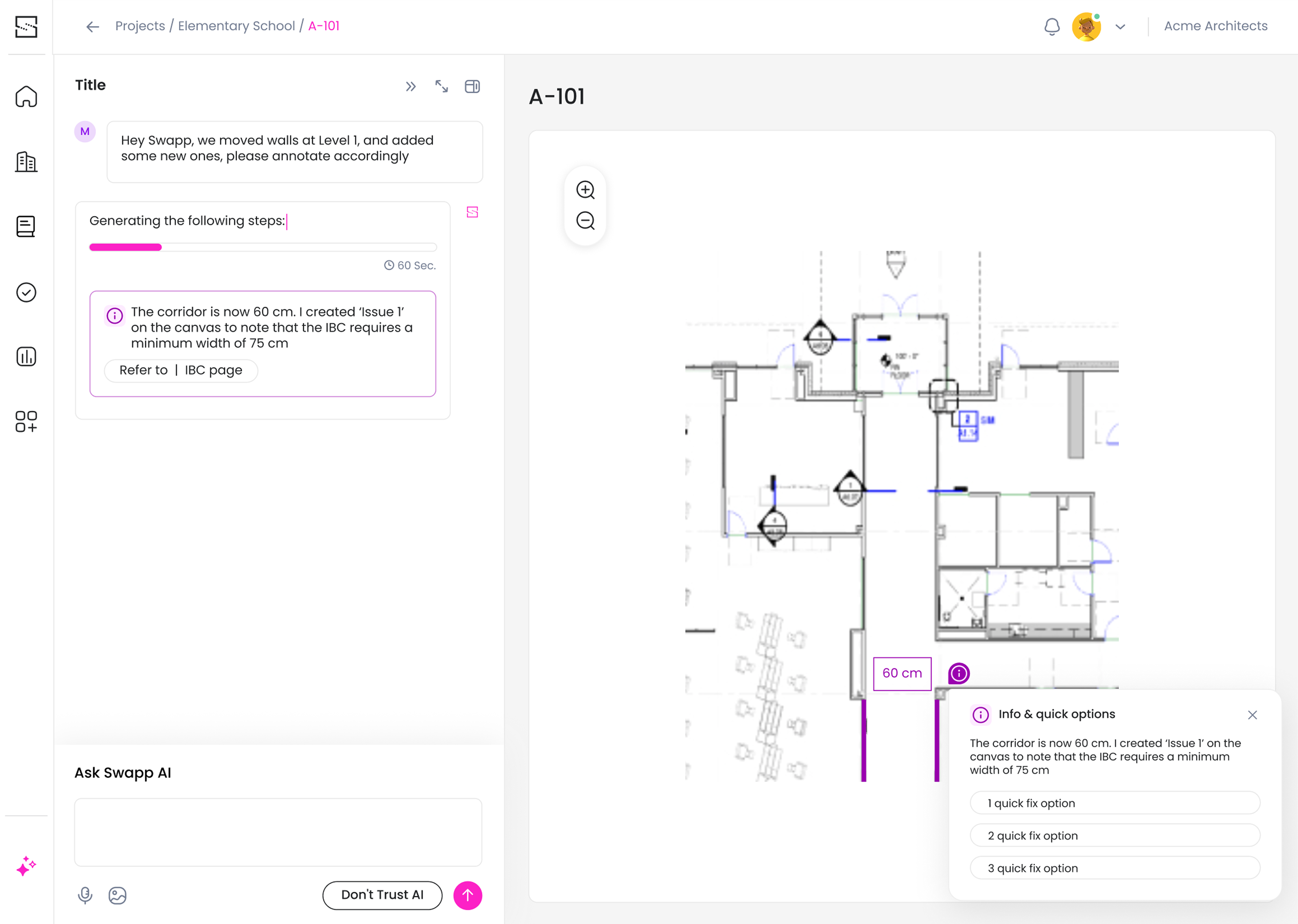
Turn Recommendations Into Reviewable Decisions
The assistant does not treat its interpretation as a final decision. It presents clear next-step options that allow the architect to review the recommendation, request another direction, or decide whether the proposed action should continue.
This interaction separates AI analysis from professional approval. The system can accelerate investigation and suggest a path forward, while the architect remains responsible for the decision and its implications for the project.
From a Single Change to Its Wider Impact
Helping architects review connected implications across the plan
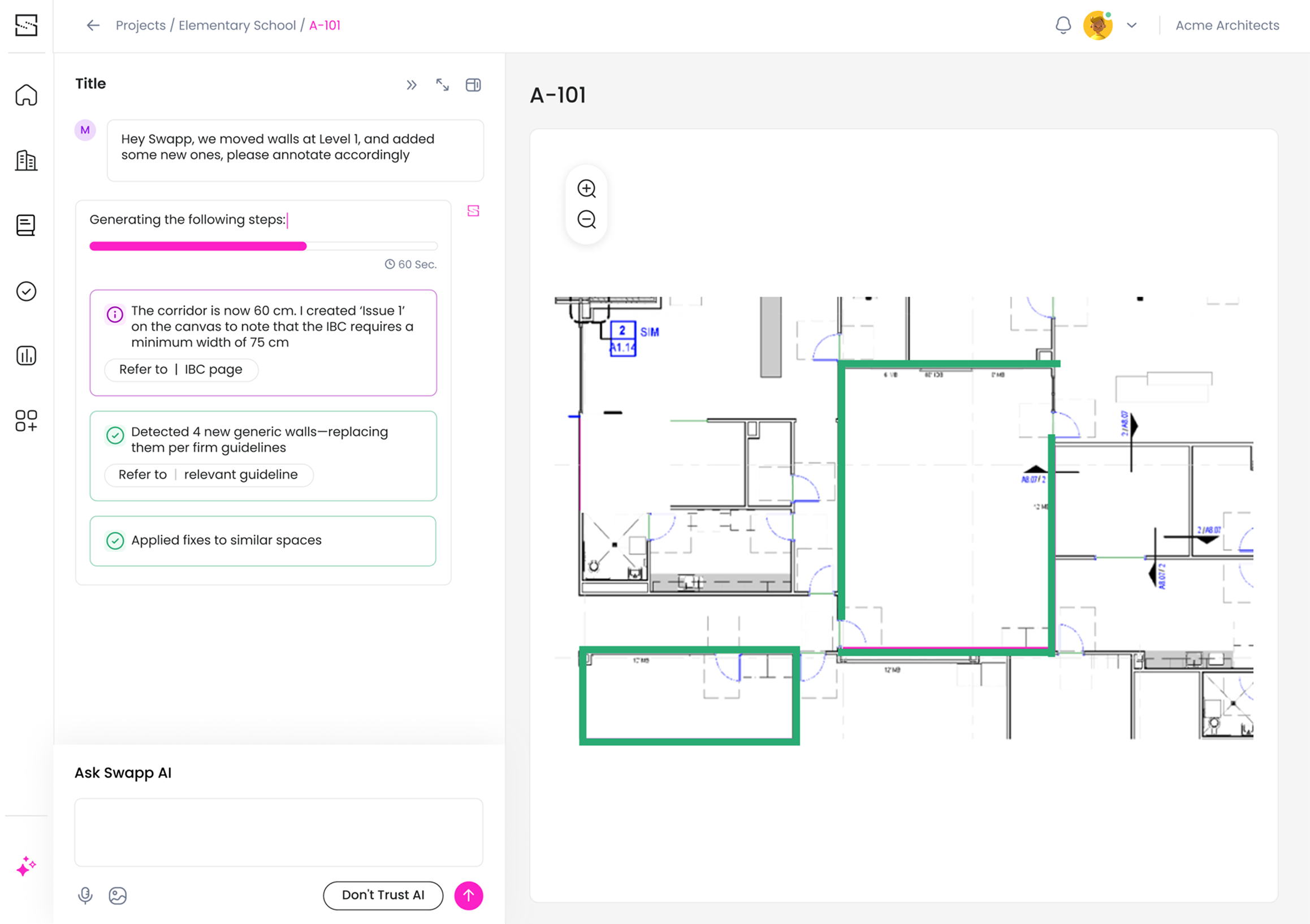
Architectural changes rarely remain isolated. Adjusting one element can create similar conditions elsewhere or affect dimensions, circulation, annotations, and surrounding components across the plan.
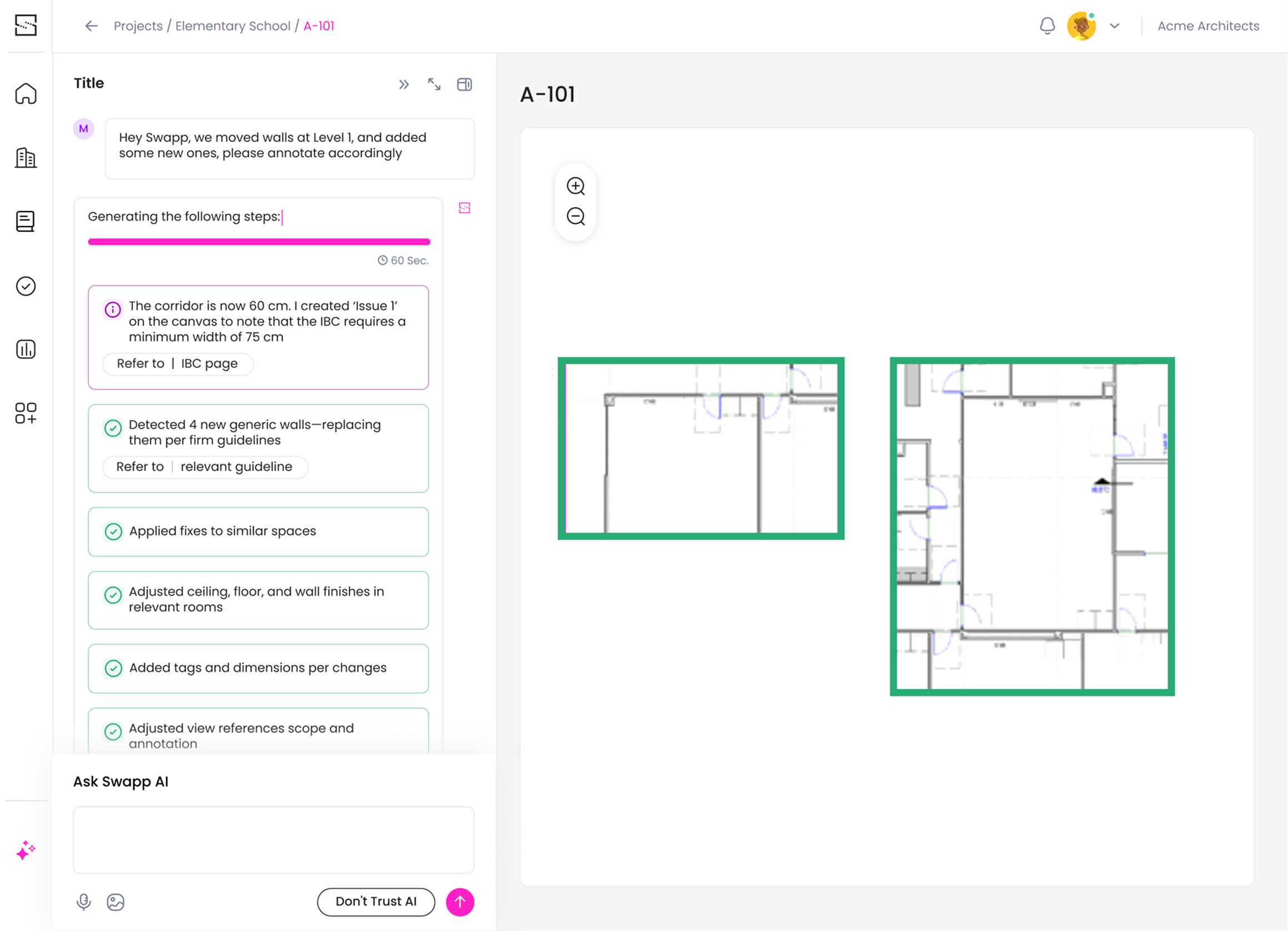
After addressing the initial request, the assistant expands the analysis to identify other locations that may require attention. These related findings are presented as a continuation of the same workflow, allowing the architect to understand how one decision connects to the broader project.
The design needed to communicate three different levels of information:
the change currently being reviewed
other locations with a similar or connected condition
the actions available for evaluating each recommendation
Rather than applying related changes automatically, the assistant surfaces them for review. This reduces the need for manual investigation while allowing the architect to evaluate each location in context and decide whether the same response is appropriate.
The result is a workflow that supports consistency without assuming that every similar-looking condition should be resolved in the same way.
The assistant extends the review beyond the initial request, surfacing connected conditions without applying them automatically.
04
05
06
Designing AI That Can Be Questioned
Trust came from making the system’s interpretation visible and reversible
In a professional workflow, an AI recommendation is useful only when the user can understand, evaluate, and challenge it.
We therefore treated explainability as part of the interaction model, not as an additional layer of information. The interface consistently connected each recommendation to its source: the architect’s request, the relevant location in the plan, the issue the system identified, and the action it proposed.
Trust was supported through a set of repeatable design patterns:
visible processing states that communicated when analysis was taking place
plan-based highlights that connected explanations to spatial context
concise reasoning before presenting an action
clarification when the request lacked necessary context
explicit review and approval before meaningful changes
These patterns made the assistant’s behavior more predictable. Architects did not need to trust the AI blindly. They were given the information and control required to decide when its recommendation was appropriate.
The goal was not to make AI appear certain. It was to give architects enough clarity to judge it.
Outcome & Reflection
Creating a framework for collaboration between architects and AI
The resulting product direction brought natural-language requests, plan-based context, explainable recommendations, related-change detection, and architect approval into one coherent interaction model.
Continuous collaboration with SWAPP’s in-house architects helped us evaluate the experience against real professional workflows. Their feedback shaped how much context the assistant needed to provide, when clarification was necessary, and which decisions had to remain explicitly in the architect’s control.
For me, the project reinforced an important principle: designing an AI product is not only about presenting intelligent output. It is about designing the relationship between the system and the person responsible for the decision.
In high-stakes professional tools, that relationship depends on:
grounding every recommendation in recognizable context
revealing enough reasoning for users to evaluate it
communicating uncertainty instead of hiding it
preserving clear moments of review and approval
allowing professional expertise to override the system
The strongest experience was not the one in which AI appeared to know everything. It was the one in which architects could understand what the system was doing, question its interpretation, and use it as a capable partner without giving up professional control.